Research and Planning

Wednesday, 4 January 2017

Task Sixteen-Character Profiles


What I have learnt:
Building a strong character is important when producing a film and this task has allowed us to do that. We will show this information to our actor who is playing the protagonist so that they will get a better understanding of their personality, physical attributes, emotional state and traits. This character profile is also fairly detailed and all areas about his life are covered so that me and my partner have a clear idea of the kind of person he is supposed to be.

Sunday, 18 December 2016

Near Final Cut- after reshoot


Learning Comment

The video above is basically our final cut, it is only missing one voice over which we need to record. At this stage we are very happy with the outcome and feel little more can be done to improve what we have editing wise. We have developed and layered the audio more than the last cut, adding more non-diogetic sound to emphasis on the protagonists meltdown. This does add to the thriller sub genre. We have also changed the order of some titles and added more in. The titles are now evenly distributed and last at least three seconds on the screen to give the viewer time to see the text. Certain shots have been improved and stablised as this edit contains footage from both shoots. The font and text has stayed the same, however it is now clearer as we have adapted the positioning and have more shots to choose from. A detailed analysis will be added along with the final cut explaining our reasoning and the opening itself.

Film Diary- 2nd Shoot (December 7th)


We decided to reshoot some of our shots to improve the quality of our video. The weather had affected our planning as we had to postpone several shoots as it was very wet and frosty which would have obviously affected the continuity. The shooting went well and all the shots we took we made sure were taken using a tripod as many of the previous shots were too shaky. Our actor, Joe, looked similar to the first time we filmed him despite having a haircut we styled his hair the same to keep the opening realistic and seamless. However, a slight issue was the sun. As we are in a wooded area, some shots did not have sun on and other did. This did change the lighting and hopefully they will fit with the other clips well and not stand out. Here are some examples


Other than this, all was well. We had to use another pair of socks but we coated them in mud and they look exactly the same. Similarly, we used the bandage and gown again in the same condition which helped continuity. 

Wednesday, 7 December 2016

Preparing For Reshoot


Learning Comment

In Todays lesson we planned our reshoot and what will take place. The image above shows what we want to improve and why. For example, stabilising shots with a tripod which we never initially did. This will improve the quality of the video and hopefully help us get the most of our footage and time. The reshoot will take place on Sunday morning/afternoon so the lighting is similar to our first time filming so the new footage will not stand out too obviously.

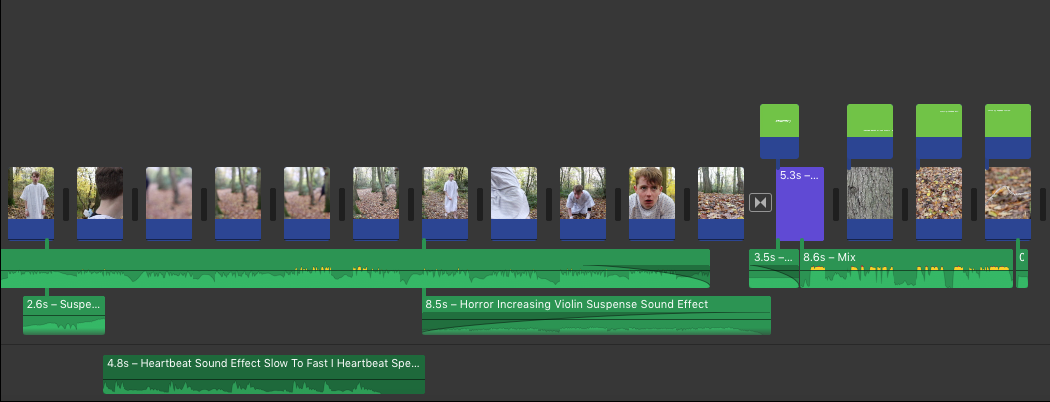
First Cut (Sound/Titles)


This video shows the next stage in our editing, sound and titles. By including these elements the opening is 
starting to take shape and look professional.

Sound:
Putting sound effects and a backing track was fairly simple because we had already found a lot of material in the sound research task. Therefore, we could simply copy them into IMovie and put them in the right areas to add effect. I believe that the sound we have included adds a lot of tension and is used in the right context. For example, the sound becomes more intense at the stage where he starts to go mad to help the audience see this. We have also included sound effects like a heartbeat as a reminder to the audience that something is about to go wrong or that all is not as it seems.


Titles:
We had an issue at first when making our titles because there was not a template on IMovie that suited our needs. Therefore, we had to use keynote, an apple application, to create our titles. This turned out to be a lot easier when positioning text and worked well. One issue we had with using keynote was that we were not able to transform the text as a dissolve etc. This meant that our titles appeared and disappeared with the length of the shots. Even though this is not what we wanted, I think this works well in the sequence because it adds grittiness.